Showing posts with label classes. Show all posts

Tuesday, February 26, 2013

Miss Ally Auction and New event blog


As some of you might be aware Nova Scotia is mourning the loss of 5 young fishermen.  There is currently an Auction running with various donations up for grabs.  100% of the proceeds will be divided between the 5 families.


I am donating a card or Cricut class for up to 5 people and Michelle Stewart is donating a registration to our Operation Autumn ReTreat for September, or $75 worth of CTMH product.  

Below are the links to our items up for bid as well as the link for the Auction itself.

Card or Cricut class

Registration for Operation ART

Miss Ally Auction

Michelle and I are going to offer more and more events together and needed a way to post info about these events as they get bigger and bigger soooooo we started an event blog "operation ART"We currently have 2 scheduled events..

March 23, 2013 Spring Fling Card Class   registration deadline: March 1, 2013 extended

  • Make 12 assorted cards of various themes including Easter for adult, Easter for child, birthday for adult (1 masculine, 1 feminine), birthday for child (1 masculine, 1 feminine), sympathy, thank you, wedding, baby, thinking of you and an all occasion one for you to choose. Click on the title above for more info.

September 20,21,22 OPERATION Autumn ReTreat registration deadline: August 25, 2013

  • Join us for an all weekend retreat with workshops included, fun, games, lots of prizes and much much more. This is an event you will not want to miss!!  Click on the title above for more info


Saturday, October 13, 2012

A Very Merry Christmas SOTM blog hop


Welcome to our October Stamp of the Month Blog Hop! This month Close to My Heart is offering a stamp set called "Very Merry Christmas". This set can be purchased exclusively through a Close to My Heart Independent Consultant for only $5 with a qualifying purchase of $50. (That’s a $17.95 value!)


In this hop, you will see projects featuring this fun stamp set from many talented crafty ladies!
Enjoy our blog hop - we hope we inspire you to create your “very” own Merry Christmas projects!

We are having a giveaway – that’s right blog candy for you hoppers! Carolyn of Nuts 4 Scrappin  is giving away a stamp set to one of our hoppers! She is giving away a stamp set called "Bonjour". You can see a picture of the stamp set on her blog. All you have to do to be eligible to win is to leave a comment on each blog and become a follower of Carolyn's blog.

If you have just hopped onto my blog, please start at the beginning at Lucy's blog – Love 2 Create. If you came from Lucy's blog – Love 2 Create then you are in the right place!


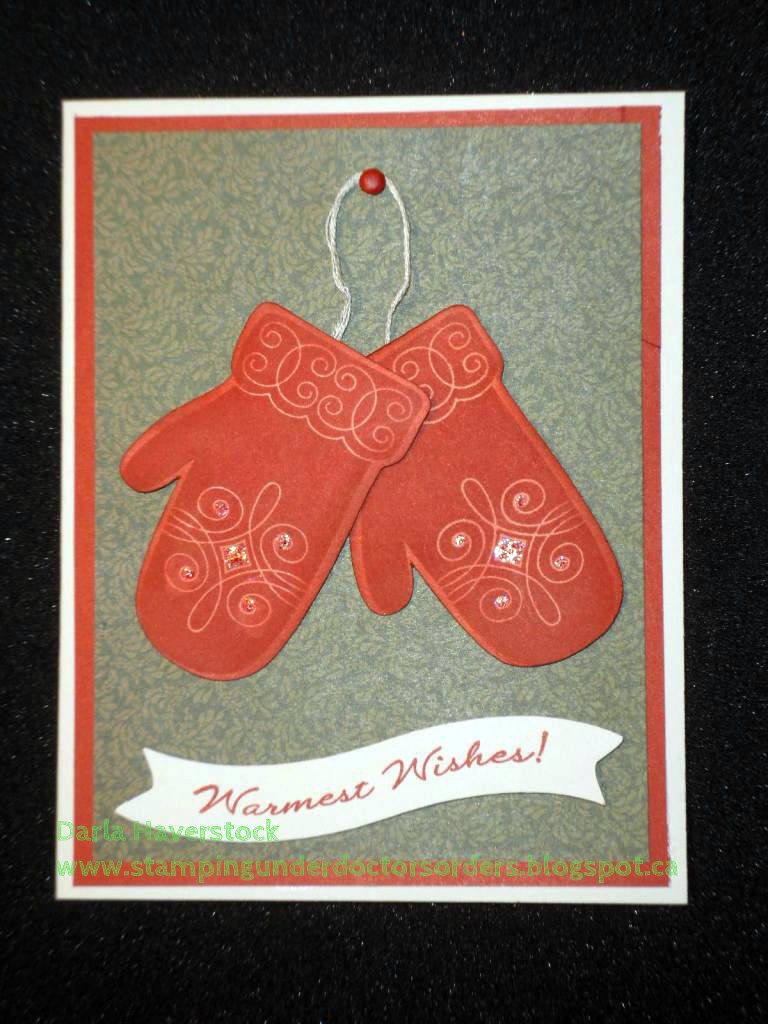
I actually felt a little guilty about how quickly my project came together for this hop. A quick couple cuts on the cricut with my Artiste cartridge... stamp, add a little extra ink on the mittens with a sponge dauber, stick the layer together and voila. Oh and of course a little bit of Stardust Glitz glitter gel to add a bit of sparkle to the mitten. Simple and easy card but I have to say I love the result.


Check it out:


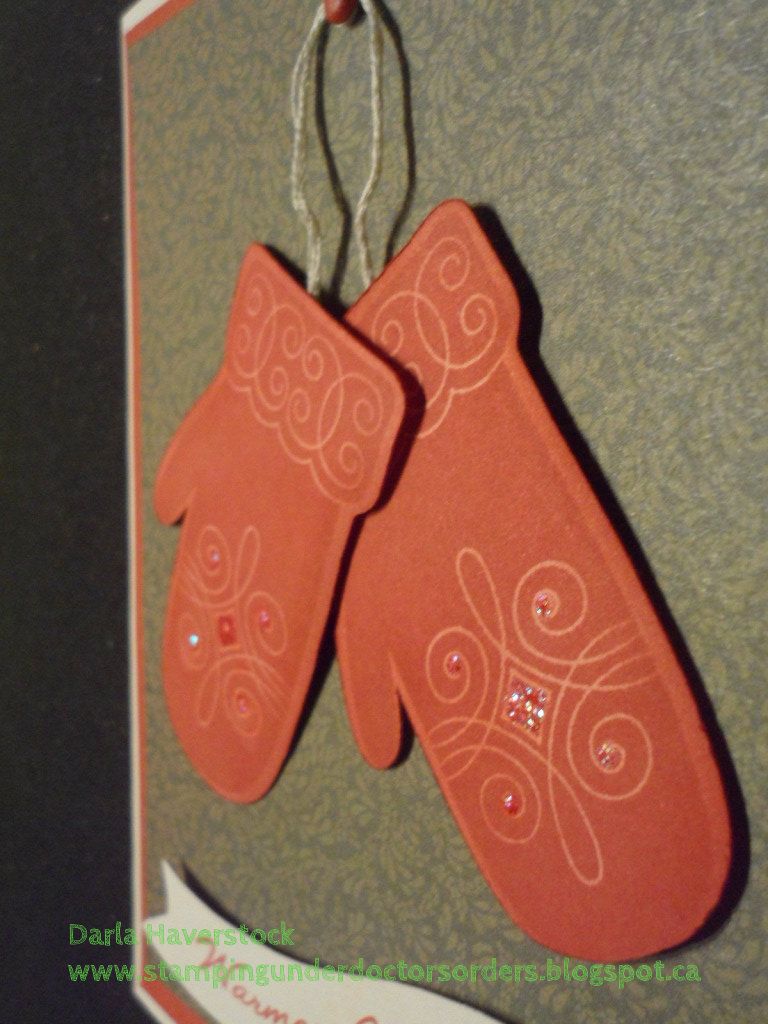
Oh, and a side shot to show the dimension added by using some 3D foam tape for the banner and mittens.

Details:
The cuts I used were all from the Artiste cartridge  They are the mitten which can be found on page 79 as well as a banner shape on page 58 that I did distort in Cricut Craft Room as I wanted it to be 3/4" x 3 1/2" but at 3/4" height it was only about 2 1/2" long so I used CCR to keep the height at 3/4" and stretch the length out.
The card base is colonial white, 2nd layer is Cranberry and the patterned paper is from the Pear and Partridge papers. I also used some colonial white embroidery floss and a cranberry brad. The ink is all of course.. cranberry ink. Mittens and banner on 3D foam tape and a little bit of Stardust Glitz glitter gel added to the mitten for some sparkle.


Your next stop on our Very Merry Christmas blog hops is Michelle  ~My Creations With Michelle

SIDE NOTE: Michelle (your next stop on this hop) and I are offering an all day, 12 card Christmas class on December 1st if you're local here in Halifax, Nova Scotia. 6 cards will be designed by myself and 6 by Michelle. Contact either one of us for more info.
If you're not local but still want to make the cards feel free to contact one of us as well as I'm sure we can arrange to put a little card kit together for you to make at home.

Products Used:


Here is the complete lineup in case you get lost along the way:

  1. Lucy ~ Love 2 Create
  2. Darla ~ Caution: Crafting is Contagious
  3. Michelle ~ My Creations With Michelle
  4. TinaGale ~ My Scrappy Ideas
  5. Jennifer ~ 4 Hearts Scrapbooking
  6. Carolyn  ~ Nuts 4 Scrappin'
  7. Stephanie  ~ The Quilted Scrapper
  8. Amanda ~ Scraps of Love
Thanks for hopping along with us - we hope we were able to inspire you to create your own "Very Merry Christmas" projects.

Saturday, April 28, 2012

Art Philosophy Blog Hop

Welcome to the Art Philosophy Cricut Cartridge Blog Hop.
All the stops along this blog hop will be show casing projects made with the very versatile Art Philosophy Cricut Cartridge. If you are visiting from Amanda's blog then you are in the right place, if not, please go and start from the beginning at my team member Courtney's blog.

I always struggle coming up with new ideas for masculine cards so I challenged my self to make one for this and here is what I came up with:

Original Artwork c CTMH
Card design by: Darla Haverstock

I used the paper lace 2 cartridge to make my own embossing folder for the background (if you're local I teach classes on how to do this). I then inked the embossed panel by lightly rubbing the ink pad over the raised parts (I used Silver Staz-on ink). The bike image and sentimetnt tag is from C1483 Born To Ride and the sentiment tag coordinates with which is the 4th row 5th column of the white buttons on the keypad overlay and is cut at 1 1/2" (which it tells you right on the stamp set what size to cut it at). The "tire tread" strip is from the stamp set that comes in the Cruisin' Workshop on the Go kit (I love this one!!).

Hope you enjoyed my project today.


Next you should go to Connie's blog and see what she has in store for you. :)


If you get lost along the way here is the entire line up

  1. Courtney - http://www.creatingwithcourtney.blogspot.com
  2. Brandy- http://www.canadianscrappers.blogspot.ca
  3. Audrey- http://scrappingwithscrappy.blogspot.com
  4. Amanda- http://ajcreationsfromtheheart.blogspot.com
  5. Darla - http://www.stampingunderdoctorsorders.blogspot.com  <---YOU ARE HERE
  6. Connie - http://conniescraftycloset.blogspot.com  <---GO HERE NEXT!!
  7. Stephanie- http://www.quiltedscrapper.blogspot.com
  8. Erin - http://www.imcreaterin.blogspot.ca
  9. Lucy - http://love2createitall.blogspot.com
  10. Vanessa http://wwwpaperkraftsunlimiteddesings.blogspot.com/
  11. Carol http://CarolLoftus.blogspot.com
  12. Eva- http://www.loveofcreating.blogspot.com
  13. Wendy K. http://www.myscrapbookingblog.com
  14. Michelle http://www.myflightsoffancy.com/blog
  15. Gloria - http://www.purpleglocreations.blogspot.com
  16. Chrissy - http://www.chrissycurtiscrafts.blogspot.com
  17. Ann Marie Lessner - www.creativeramblings345.blogspot.com
  18. Michelle Degnan Powell - http://scrappinprincess-michelle.blogspot.com/

Tuesday, April 24, 2012

INSIDE THE CRAFTERS STUDIO - Celebrate easel card

This is my project that I made for my guest designer spot over at CreatingwithArtPhilosophy for February 10th, 2012. If you attended my full day cricut class in Truro you got to make this for yourself. :) For this card I used the center point feature with the cricut marker to create the white shaped layer with the brown frame inside. I made a video on how to do this which you can find here

Everything for this card was cut using the Art Philosophy cricut cartridge. The stamps used were the ones that come bundled with the cartridge as well. :)


Monday, April 9, 2012

Learn to make your own embossing folders using your cricut!!!

Book now for Sunday April 15th class at Carousel Rubber Stamps in Dartmouth, NS!! Phone 464-9474 to reserve your spot in the class.

Learn how to make a traditional cuttlebug style embossing folder, make a card with it and take them home as well as learn to make an impressabilities style embossing stencil, make a card with it and take them.
I will also show another couple ways to make them as well.

Friday, May 6, 2011

Next class scheduled

Just an update on the cricut classes.
The next class is scheduled for May 28 @ 1pm at Carousel Rubber Stamps in Dartmouth. This will be the absolute beginner one again for those that missed it.

Also for the extra advanced people out there I have received a copy of Fairycuts software to teach those who might be interested. I Wouldve taught MTC or SCAL but MTC is no longer available for the cricut and SCAL is probably not around much longer for it. I currently use another program for my other cutters called Funtime and it is an almost identical program to fairycuts and I LOVE it!! Very user friendly, lots of features, tutorials, etc etc etc. If you were looking to get a 3rd party software I would suggest doing it sooner rather than layer as provocraft I'm sure will be suing fairycuts before we know it as well. A warning for it though, it is not sanctioned by provocraft which means if they win their lawsuits and those 3rd party softwares are taken off the market you will probably run into problems if you update your cricut firmware downthe road (which you need to do if you use Design Studio of the soon to be released cricut craft room as new cartridges come out and you want to use them withthe cricut programs or they wont show up in the programs). If you're not concerned about the ability to use new cartridges as they get released with the cricut software (you will still be able to use them in the machine alone) then you won't have any issues.

Sunday, April 17, 2011

How to use your Cricut class

Do you live in Halifax/Dartmouth area? Do you own a cricut machine but either don't know how to use it or are looking for more ways to use it? Have something specific you want to learn, etc???
I am teaching cricut classes now at Carousel Rubber Stamps in Dartmouth and would love to help getting you to use your machine more!!!

Please email myself darlamcc@eastlink.ca or contact Carousel 902-464-9474 for more info or to let them know you're interested and exactly what you're looking to learn at a class. We need this info as I am trying to tailor the classes to those who want them.

There has already been 2 classes for the absolute beginner who has a machine but is not sure where to start. This class covers basics like keeping your mat useable for a long time, changing blades, how to use a cartridge and which buttons to press to get it to cut everything you can from the cartridges, what orientation to expect the images to cut, how to adjust the size for what you want... It also covers how to cut your layered images so the fit together properly. Lots more is covered in the class but it truly is a "basic" class and is not intended for more experienced users. This class will be offered again if there is enough people interested. You will see how to create a simple card with a layer during this class as well.

I am in the process of developing the second class in this series for the next step.... So far I will be including topics such as your extra function buttons and when/why to use them (these are the fit to page,fit to length, auto fill, quantity, etc buttons as well as the multicut feature, center point, etc. Basically all of those buttons between the display and the keyboard overlay.

Looking to develop more advanced classes as well... Perhaps a class on using Design Studio?? Maybe you know how to use the machine but are looking for ideas we could do a class on making embossing folders from cereal boxes? Maybe you want to see other materials cut such as magnet, vinyl, chipboard, stencil plastic, acetate, etc with some tips and tricks??

The classes will be made to suit those interested so speak up!!!!! :)

  
Get widget